Built for Alberta School Divisions
Frustrated by curriculum resources no one can find?
Bring your division’s resources out of the dark. TeachNEW replaces scattered folders with digital binders and a live weekly calendar, giving teachers the tools they need and giving leadership the Alberta curriculum coverage picture you’re expected to provide, without adding a single reporting task to your staff.
Prefer a 3-minute diagnostic first? Take the assessment
Google Verified App · Single Sign-On · No new passwords for teachers
Built around Alberta's K–12 curriculum structure (KUSP).
The Problem
The 3 Costly Traps of Fragmented Resource Sharing
Right now, your division's best teaching resources are scattered across hundreds of individual Drive folders. They're invisible to the teachers who need them and to the leadership team accountable for what's being taught.
The "Drive" Black Hole
Resources live in scattered Drive folders, websites, and links buried in slideshows. Staff turnover and inconsistent naming make the right lesson nearly impossible to find, so teachers keep rebuilding what a colleague already perfected.
The Siloed Creation Trap
Teachers are building brilliant custom and AI-assisted lessons, but with no division-wide way to share them, that work never leaves individual laptops. You get isolated pockets of excellence instead of scalable success.
The Leadership Blind Spot
Leadership can't see what's actually being taught, which outcomes are covered, or which resources work. Without that visibility, aligning professional development with classroom reality is guesswork.
No division platform works without teacher buy-in.
See why teachers want to use it, or share this page with your staff.
Free curriculum assessment
See where your division actually stands.
15 questions. Three minutes. Immediate results — no account, no sales call.
The Solution
The Antidote to Fragmented Resources
Meet TeachNEW: the planning and curriculum intelligence platform that turns your teachers' everyday planning into the Alberta curriculum coverage picture your board expects, without adding a single reporting task to your staff.
Finally, a curriculum-shaped home for every resource.
Every lesson, unit, and resource organized by subject and curriculum, visible across your whole division. Your existing Google Drive files come with you. No migration needed.
- Digital Binders, Not Folder Chaos: Every resource organized by Subject → Unit → Lesson.
- AI-Matched Outcomes: AI suggests the matching Alberta outcome. Teachers confirm with one click.
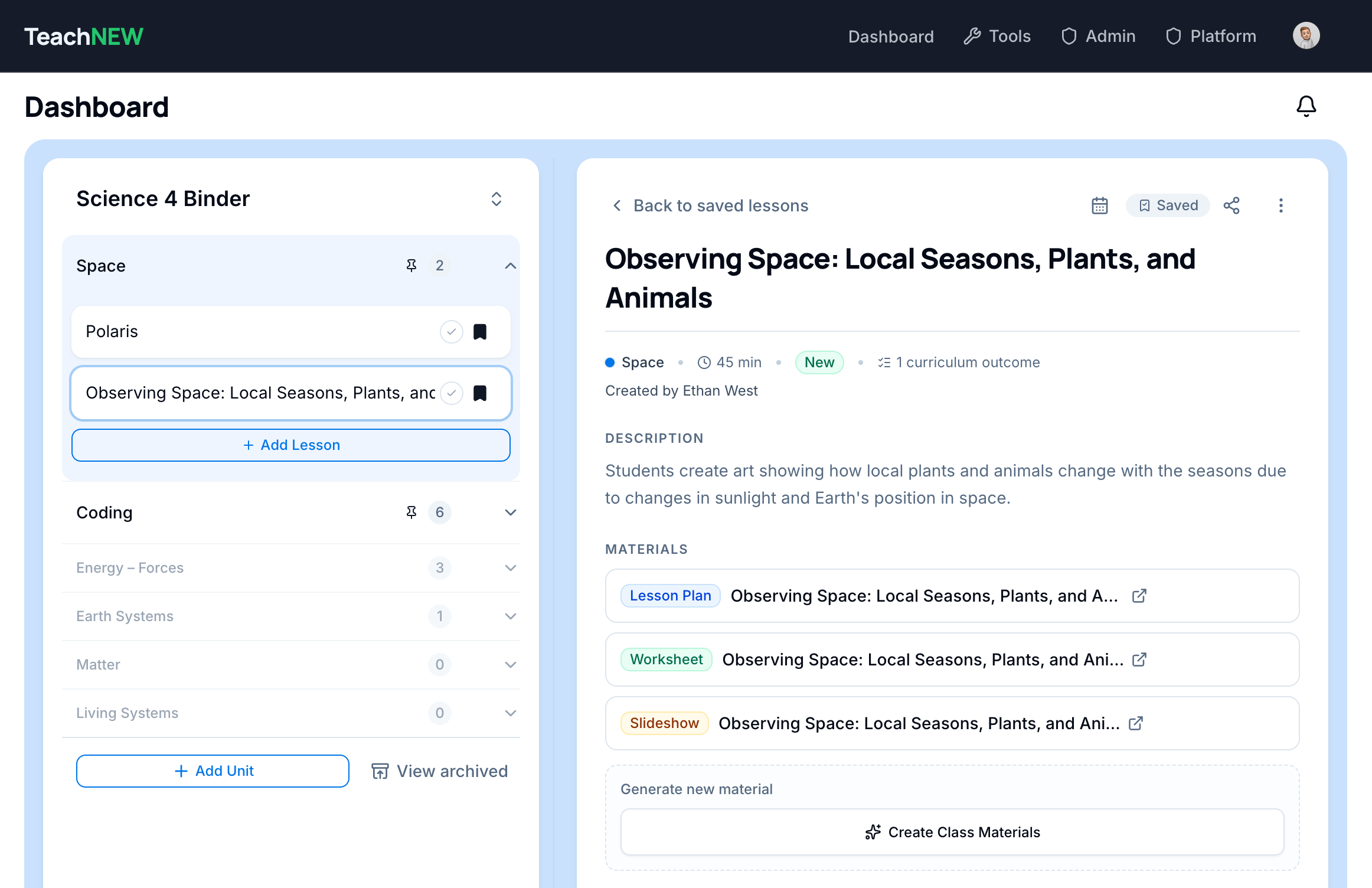
Turn individual innovation into scalable success.
Don't let your best teaching resources stay trapped in one classroom. TeachNEW gives teachers a one-click path to publish their best work division-wide.
- Division-Wide Publishing: Share a lesson to the whole division, or directly with chosen colleagues.
- Outcome-Filtered Discovery: Search community lessons by the exact outcome you need next.
- Proven & Complete: Ratings and save counts surface the best lessons, each with its full kit of plans, worksheets, and assessments.
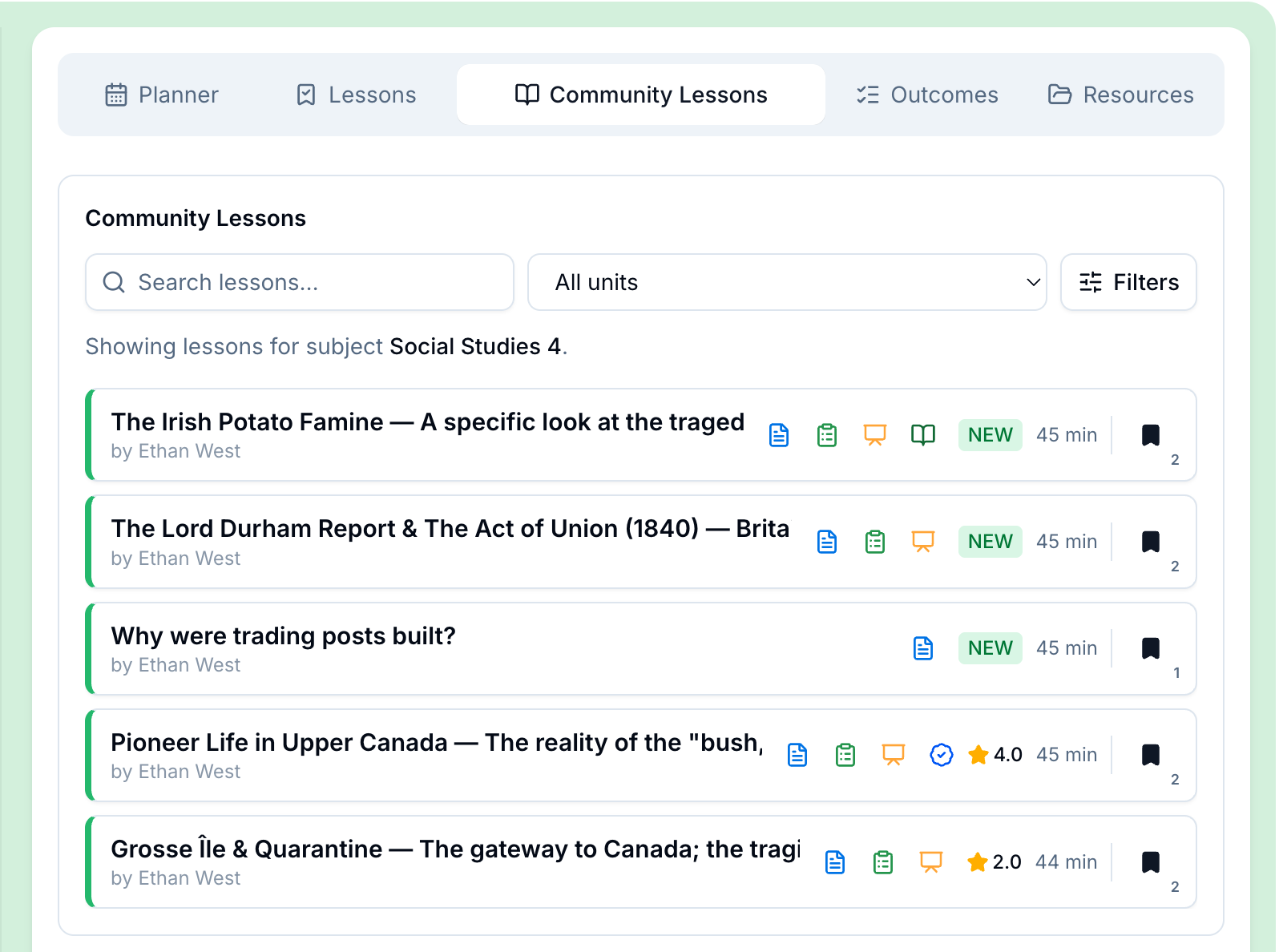
A live division-wide view of what's actually being planned and taught.
TeachNEW aggregates every lesson into a bird's-eye view of coverage across Alberta's curriculum structure, turning raw data into clear recommendations, not just reports.
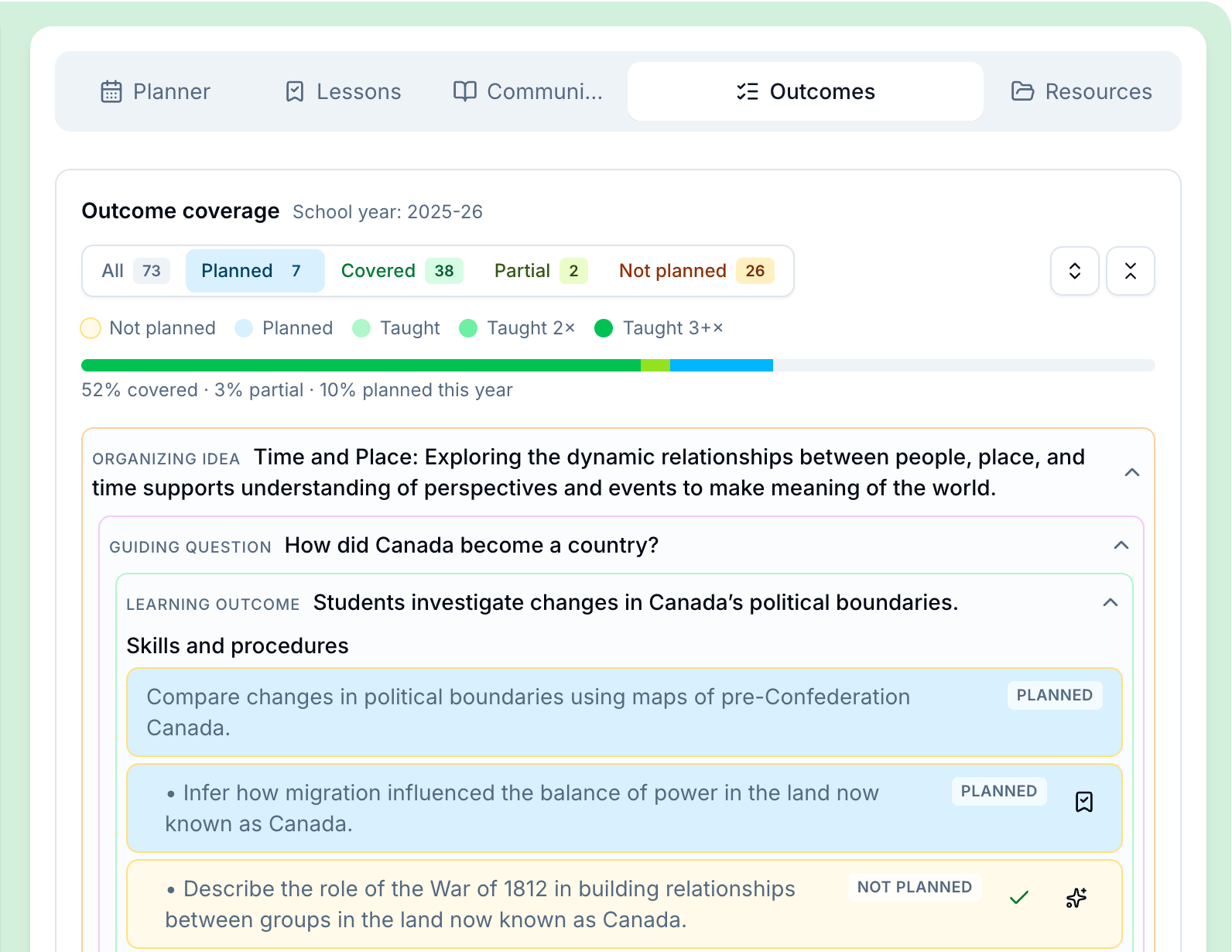
- Coverage & Intensity Reports: See which outcomes are well-covered, and exactly where the gaps are.
- AI Narrative Insights: Coverage data becomes leadership-readable summaries and suggested focus areas, ready to share with your board or superintendent.
- Impact at a Glance: Heat maps show teachers their personal coverage; leadership sees the division-wide picture and highest-value lessons.
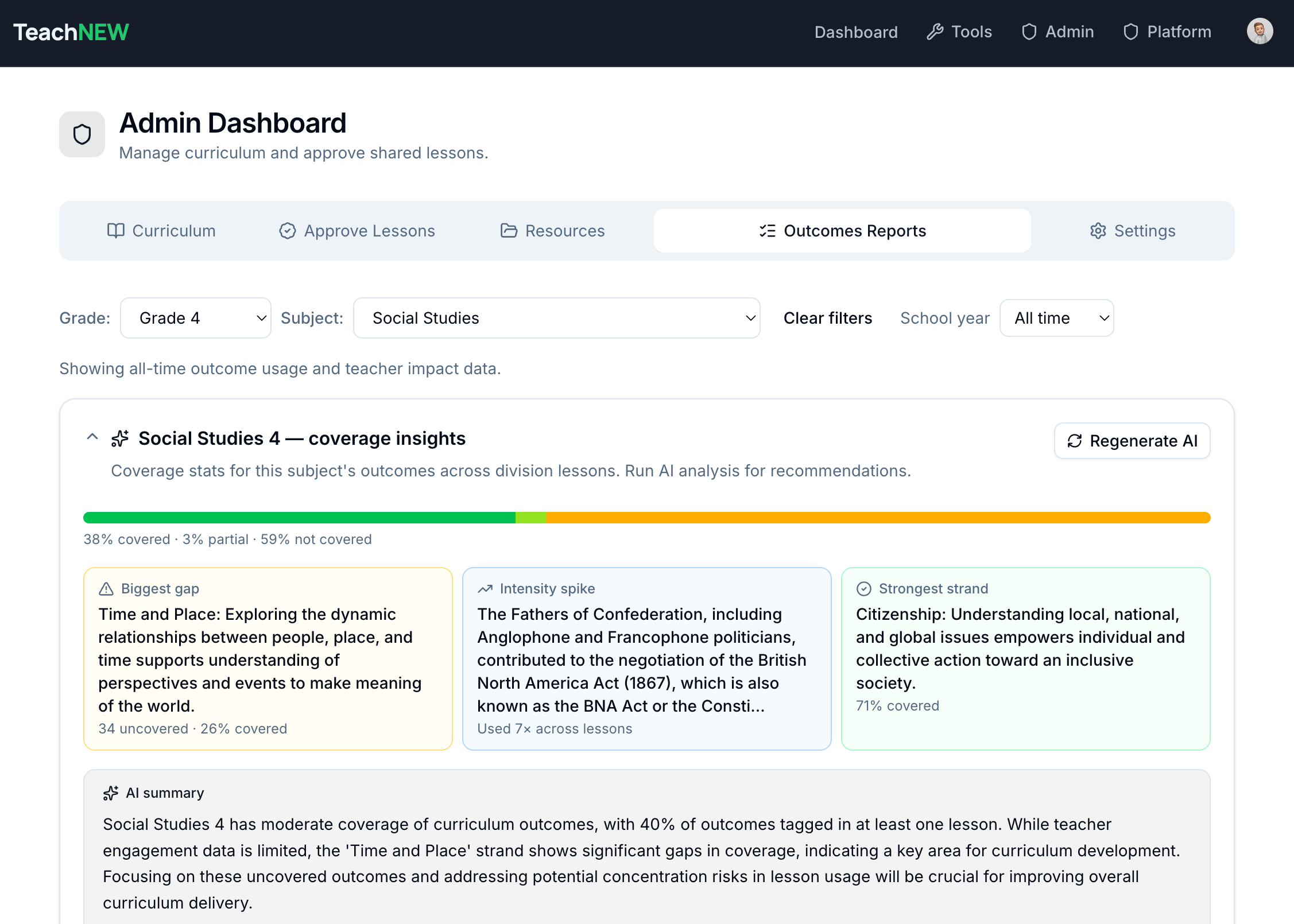
Built for the Classroom
Teachers Actually Want to Use It
The best resource platform is the one teachers open every day, not the one that sits unused after onboarding. TeachNEW is immediately useful with zero learning curve.
Wondering if your staff will actually adopt it? Forward the teacher one-pager to get their honest take before you book a walkthrough.
Sign In and Go
One click with their existing Google account. No new passwords, no IT tickets, no training day.
Your Drive Files in Digital Binders
Add existing Slides, Docs, and Drive files to a digital binder with one click. Their Drive stays exactly as-is.
Share Lessons in One Click
Send a lesson and all of its materials to a teaching partner with one click. Or search curriculum-aligned lessons in your division, rated by teachers themselves so the strongest resources rise to the top.
Print Your Week in One Click
The weekly calendar mirrors a real bell schedule. Print a clean, slot-by-slot copy for the binder, the sub, or the bulletin board.
Build Straight from a Gap
See an uncovered outcome, click it, and the lesson wizard opens with that outcome already loaded.
Adapt Any Material to Your Class
Take any material, yours or a colleague's, and adjust it in place: duration, reading level, or small-group scaffolds.
Capabilities
A Complete Planning Stack, Not Just a File Cabinet
From unit design to daily schedules to assessments, every tool keeps your division's coverage picture current as a side effect of normal planning.
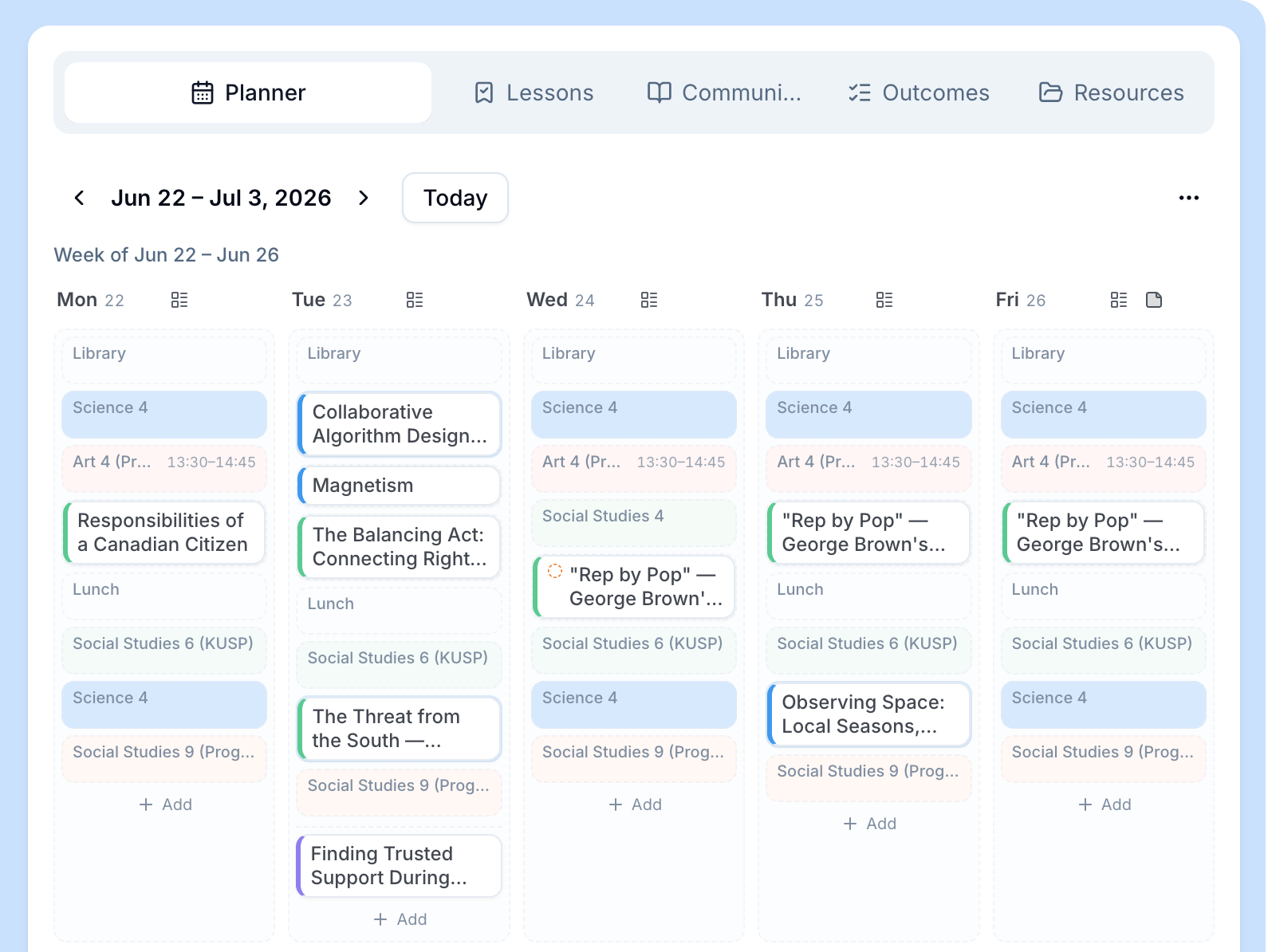
Teaching Calendar
Plan Your Real Week, Not Just a Lesson List
Your bell schedule becomes the calendar. Drop lessons into periods, shift a subject when life happens, and print the week in one click. Mark it taught, and your coverage map updates itself.
Unit Plan Wizard
Build Full Unit Plans with AI
Design full units with AI, or import existing plans from PDF or Drive. Unit slots link straight to real lessons. Every plan arrives in the classroom outcome-aligned.
Assessment Wizard
Build Outcome-Aligned Assessments
Generate outcome-aligned assessments in any format, with built-in ELL support and adjustable reading levels. Consistent, defensible assessments across your whole division.
Material Wizards
Worksheets, Slides & Student Materials
Generate a full kit around any lesson, then adapt it: change the duration, add scaffolds, or adjust for small groups. Teachers adapt shared materials rather than rebuilding from scratch, so your PD investment compounds.
How It Works
From Gap to Taught in One Platform
Spot a missing outcome, build the unit and lesson, generate materials and assessments, schedule it, teach it, and watch division coverage update. Planning and reporting become the same action.
Spot the gap
The coverage tree shows exactly which outcomes aren't planned yet, for teachers and for leadership.
Build from the gap
One click on an uncovered outcome pre-seeds the lesson wizard. No re-typing the curriculum.
Generate the kit
Lesson plan, worksheet, slides, and a outcome-aligned assessment, structured by research-backed pedagogy.
Schedule it
Drop the lesson into a real period on your weekly calendar.
Teach it, mark it taught
One tap in the planner records what actually happened in the classroom.
Coverage updates everywhere
Your personal heat map and the division-wide picture update at the same moment. Leadership sees live data. No status meetings, no spreadsheet requests, no survey.

Who's Behind TeachNEW
Built in Alberta, for Alberta classrooms.
I'm Ethan West, an educator with over twenty years in Alberta classrooms and a software developer whose SIS, gradebooks, and scheduling tools have reached thousands of teachers worldwide. Over that time, I've also worked closely with curriculum directors and school administrators, which means I understand what leadership needs to see, not just what teachers need to use. I built TeachNEW after two decades of watching great teaching materials disappear into Drive folders no one could find again. As a founding division, that means working directly with the person who builds the product: honest answers, fast turnarounds, and a roadmap shaped by your teachers, not a support ticket queue.
Ethan WestFounder, TeachNEW
Alberta, Canada
Governance & Privacy
Built for Alberta School Division Governance
We work the way school divisions actually buy and run software. Privacy, IT, and procurement requirements are handled before you ask, not after you sign.
Privacy & POPA Compliance First
Student data never enters an external AI model. Built for strict division governance: POPA, ATIA, records management, and Privacy Impact Assessments are on the table from day one, not an afterthought.
A Privacy-Friendly Split for AI
AI authoring is split by design: TeachNEW structures the pedagogy outline, and teachers finish it using the Gemini access already included in their school's Google Workspace for Education account. No new login, no extra cost.
Division-Aligned Infrastructure
Deployment is aligned to your division's environment, with IT and instructional leadership on the same roadmap from day one. No procurement surprises, no post-signature revelations.
Implementation
Your Blueprint for Implementation
A clear, structured path to modernizing your division's resources without overwhelming your staff.
Secure Setup & Orientation
We work with your IT department to create a secure, private database for your division and train your leadership team. From there, your team simply adds existing materials to start populating your new curriculum and professional development resource libraries.
Teacher Pilot: Plan, Build & Share
A pilot group brings in their existing materials while AI handles the curriculum mapping, then goes further: building units, lessons, and assessments with the wizards and planning real weeks on the teaching calendar. We run weekly check-ins to ensure everything is running smoothly.
Review Impact
We present a formal impact summary with the leadership data: division-wide coverage maps, teacher adoption rates, highest-value shared lessons, and estimated instructional time reclaimed. Pilot teachers introduce it to their peers, and you leave with data you can take to your board.
New for Alberta School Divisions
Join the Alberta Founding Partner Cohort
Founding divisionsget something later customers can't buy: locked-in pricing, a roadmap shaped by your teachers' real feedback, and direct access to the person building it. TeachNEWis new, and that's exactly why the terms available today won't be on the table in 12 months.
As a Founding Partner, you work directly with our founder, not a support queue, with prioritized onboarding and a structured, zero-risk pilot before any long-term commitment is made.
A pilot can start whenever you're ready. The onboarding is lightweight by design: no dedicated project, no change management plan, no full IT sprint required to get going.
What happens on your Division Walkthrough?
No high-pressure sales. Just a 30-minute video call:
- We discuss your current planning, sharing, and visibility challenges.
- You see the platform live: the teaching calendar, lesson and assessment wizards, and the leadership impact dashboards.
- We're upfront that TeachNEW is new: you'll see exactly what's built today, what's on the roadmap, and what founding-partner status means for your division, and we'll tell you honestly if it's not the right fit.
- We determine if a pilot is the right fit and outline practical next steps.
Start whenever you're ready. No commitment required.
30 minutes, zero pressure.